Start off 2020 by showing your clients all the progress you've made with them with AdviserGo's new My Plans screen. You can now view all your Active and Older plans on the My Plans screen.
Click on the name of the plan to go to your My Plans screen:

Your Active and Older plans will be visible, including each plan's respective What Ifs. The plan you're currently viewing (Current Plan) is first in the list.
This robust update allows you to compare Active and Older plans, either from the My Plans screen, or from Let's See:

This can allow you to show clients the progress you've made over the years. You can demonstrate to them how much their financial outcome has improved or how many goals they’ve accomplished since the first day you met with them:

Exclusively in the UK and Ireland, you can also run an IHT/CAT Let’s See (respectively) comparing an Active plan with another plan, to show your clients how their Older plans fare against the IHT/CAT with their Active plans:
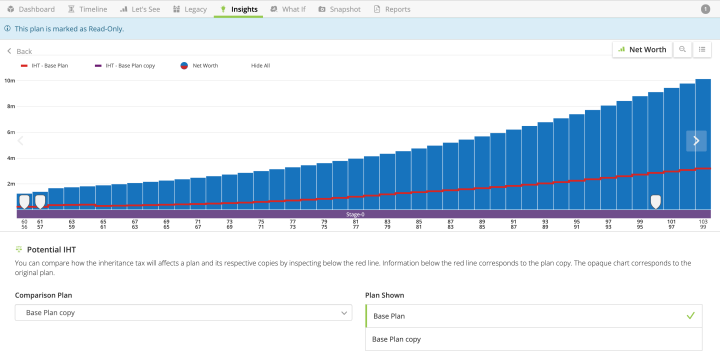
Being able to view Older plans is useful when it comes to inheritance planning. You can compare both Active and Older plans' legacy outcomes under Legacy:

Additionally, you can generate reports for both Active/Older plans, highlighting the aspects of the plan that have changed:

Keep in mind that other than the above examples, Older plans are read-only. Additionally, you can only create copies of an active plan.
In addition to our major My Plans screen update, we've added further clarity to AdviserGo by indicating which fields are required:

We're excited to continue adding features and functionality for you. As always, if you have any questions please email support@planwithvoyant.com.
